
Lesson 03: What is OpenCV?
 Viet-Anh Nguyen
OpenCV (Open Source Computer Vision) is an open-source library that provides a wide range of computer vision algorithms and techniques. It was originally developed by Intel in 1999 and is now maintained by the OpenCV Foundation.
OpenCV is written in C++ and has interfaces for Python, Java, and MATLAB. It runs on a variety of platforms, including Windows, Linux, and macOS, and supports a range of programming languages.
OpenCV features a wide range of functions and tools for image processing, computer vision, and machine learning. It includes algorithms for feature detection, image recognition, object tracking, face detection, and more. OpenCV also provides tools for video processing, including video streaming, video capture, and video analysis.
OpenCV is widely used in research and industry, and has been used in a wide range of applications, including robotics, surveillance, augmented reality, and medical imaging. Its flexible and powerful features make it an ideal choice for developing advanced computer vision applications.
Some of the key features of OpenCV include:
- Image and video processing: OpenCV provides a wide range of tools for processing images and videos, including filtering, thresholding, and transformation functions.
- Feature detection and tracking: OpenCV provides a variety of algorithms for detecting and tracking features in images and videos, including SURF, SIFT, and ORB.
- Object detection and recognition: OpenCV includes powerful algorithms for detecting and recognizing objects in images and videos, including the popular Haar Cascade classifier.
- Machine learning: OpenCV includes a range of machine learning algorithms, including decision trees, support vector machines, and neural networks.
- Cross-platform support: OpenCV is available on a wide range of platforms and supports multiple programming languages, making it a versatile and flexible library.
Overall, OpenCV is a powerful and versatile library that provides a wide range of tools and algorithms for computer vision and image processing. By learning to use OpenCV, you can develop advanced computer vision applications for a variety of real-world use cases.
Installation
# Core package — all you need for this course
pip install opencv-python numpy matplotlib

# Optional: contrib modules (extra algorithms)
pip install opencv-contrib-python
Verify your installation:
import cv2
print(cv2.__version__)  # e.g. 4.10.0
Your First OpenCV Program
Let's load a real image from the internet and explore it with OpenCV:
import cv2
import urllib.request
import numpy as np

# Download the classic Ultralytics test image
urllib.request.urlretrieve(
    "https://ultralytics.com/images/bus.jpg", "bus.jpg"
)

img = cv2.imread("bus.jpg")

# --- Basic introspection ---
h, w, c = img.shape
print(f"Size:     {w} x {h} pixels")        # e.g. 810 x 1080
print(f"Channels: {c}")                      # 3 (BGR)
print(f"Dtype:    {img.dtype}")              # uint8
print(f"Total pixels: {h * w:,}")           # e.g. 874,800

# --- Convert to grayscale ---
gray = cv2.cvtColor(img, cv2.COLOR_BGR2GRAY)
print(f"Grayscale shape: {gray.shape}")      # (1080, 810) — single channel

# --- Display ---
cv2.imshow("Original (BGR)", img)
cv2.imshow("Grayscale", gray)
cv2.waitKey(0)
cv2.destroyAllWindows()

# Expected: two windows open — the full-color bus scene and its grayscale version
OpenCV Coordinate System
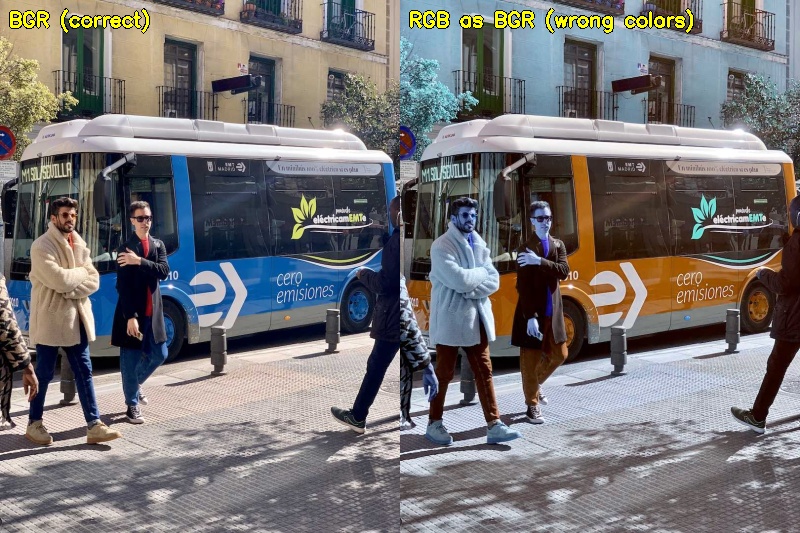
One important quirk: OpenCV reads images in BGR order (Blue-Green-Red), not RGB. This matters whenever you use Matplotlib or convert to other libraries:
import cv2
import matplotlib.pyplot as plt
import urllib.request

urllib.request.urlretrieve("https://ultralytics.com/images/bus.jpg", "bus.jpg")
img_bgr = cv2.imread("bus.jpg")

# Wrong — colors will look off (red ↔ blue swapped)
plt.imshow(img_bgr)
plt.title("Wrong: BGR shown as RGB")
plt.show()

# Correct — convert to RGB first
img_rgb = cv2.cvtColor(img_bgr, cv2.COLOR_BGR2RGB)
plt.imshow(img_rgb)
plt.title("Correct: RGB")
plt.show()
Now that you know what OpenCV is and how to install it, the next lesson dives into the core image operations you'll use in every CV project.