
Lesson 6 of 10
Lesson 06: Hand Pose Detection
4 min read Viet-Anh Nguyen
Viet-Anh NguyenHandPoseDetectorFlow detects hands and then estimates 21 3D keypoints per hand — fingertips, knuckles, and the wrist. The underlying models are a YOLOX-based hand detector and a ported version of Google's MediaPipe hand landmark model.

Configuration
import json
from daisykit.utils import get_asset_file

config = {
    "hand_detection_model": {
        "model": get_asset_file("models/hand_pose/yolox_hand_swish.param"),
        "weights": get_asset_file("models/hand_pose/yolox_hand_swish.bin"),
        "input_width": 256,
        "input_height": 256,
        "score_threshold": 0.45,
        "iou_threshold": 0.65,
        "use_gpu": False,
    },
    "hand_pose_model": {
        "model": get_asset_file("models/hand_pose/hand_lite-op.param"),
        "weights": get_asset_file("models/hand_pose/hand_lite-op.bin"),
        "input_size": 224,
        "use_gpu": False,
    },
}
Tuning score_threshold:
- Lower (e.g., 0.3) → detect more hands, more false positives
- Higher (e.g., 0.6) → only confident detections, may miss partially visible hands
Real-Time Webcam Demo
import cv2
import json
from daisykit.utils import get_asset_file, to_py_type
from daisykit import HandPoseDetectorFlow

config = { ... }  # as above

flow = HandPoseDetectorFlow(json.dumps(config))
cap = cv2.VideoCapture(0)

while True:
    ret, frame = cap.read()
    if not ret:
        break

    rgb = cv2.cvtColor(frame, cv2.COLOR_BGR2RGB)

    poses = flow.Process(rgb)
    flow.DrawResult(rgb, poses)

    display = cv2.cvtColor(rgb, cv2.COLOR_RGB2BGR)
    cv2.imshow("Hand Pose Detection", display)

    if cv2.waitKey(1) & 0xFF == ord("q"):
        break

cap.release()
cv2.destroyAllWindows()
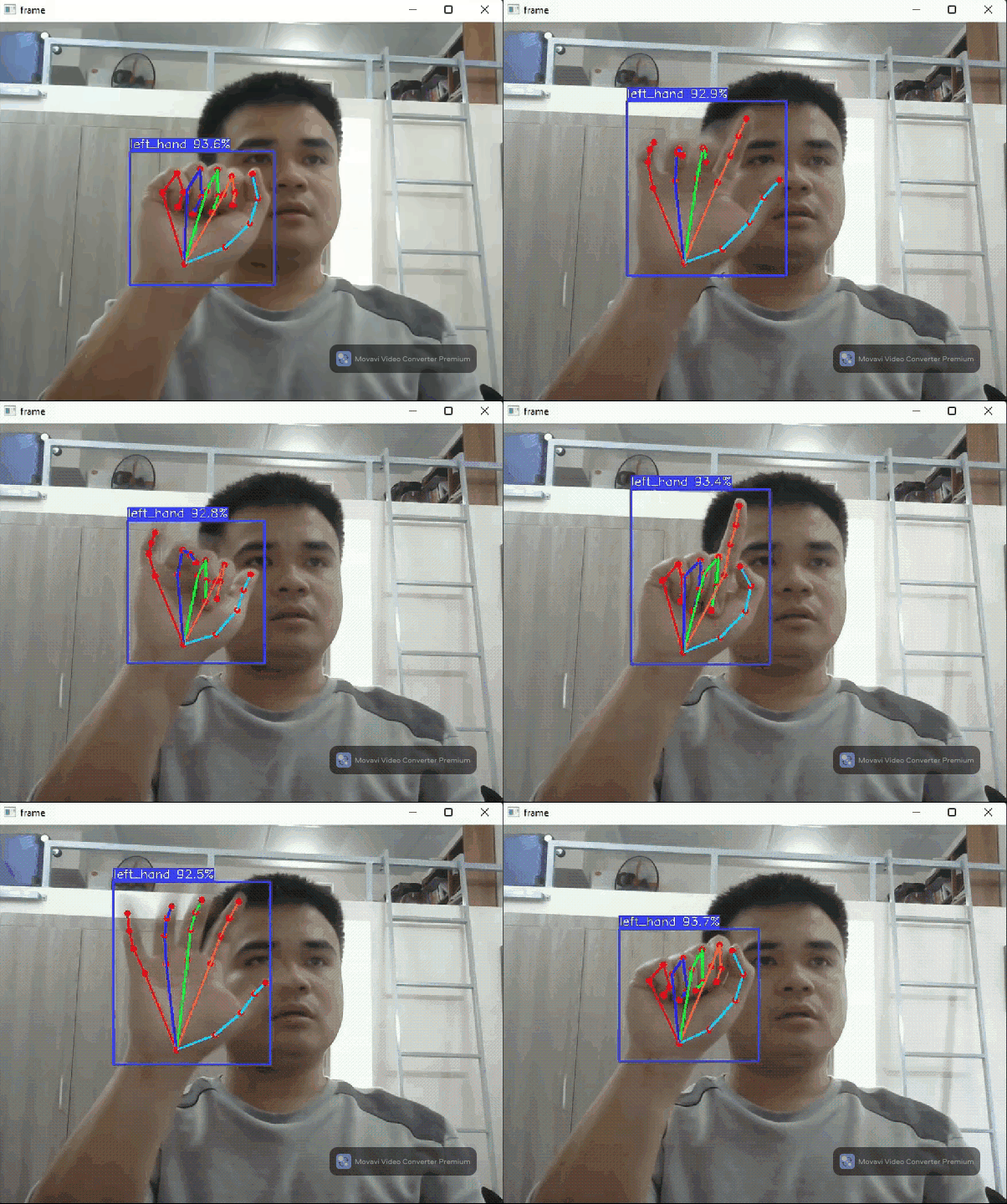
Hand Keypoint Layout
The 21 keypoints follow the MediaPipe convention:
Wrist: 0

Thumb:  CMC=1, MCP=2, IP=3,  TIP=4
Index:  MCP=5, PIP=6, DIP=7, TIP=8
Middle: MCP=9, PIP=10,DIP=11,TIP=12
Ring:   MCP=13,PIP=14,DIP=15,TIP=16
Pinky:  MCP=17,PIP=18,DIP=19,TIP=20
Each keypoint has x, y (pixel coordinates) and z (depth relative to wrist).
Reading Keypoints and Building a Gesture Detector
from daisykit.utils import to_py_type
import math

def finger_extended(tip, pip, mcp):
    """True if the finger is roughly straight (extended)."""
    # Compare tip y position to pip y — extended finger has tip above pip
    return tip["y"] < pip["y"]

rgb = cv2.cvtColor(frame, cv2.COLOR_BGR2RGB)
poses = flow.Process(rgb)
poses_py = to_py_type(poses)

for hand in poses_py:
    kps = hand.get("keypoints", [])
    if len(kps) < 21:
        continue

    # Check which fingers are extended
    thumb_up  = kps[4]["x"] > kps[3]["x"]     # thumb tip to the right of IP joint
    index_up  = finger_extended(kps[8],  kps[6],  kps[5])
    middle_up = finger_extended(kps[12], kps[10], kps[9])
    ring_up   = finger_extended(kps[16], kps[14], kps[13])
    pinky_up  = finger_extended(kps[20], kps[18], kps[17])

    fingers = [thumb_up, index_up, middle_up, ring_up, pinky_up]
    count   = sum(fingers)

    gesture = "Unknown"
    if not any(fingers):        gesture = "Fist"
    elif all(fingers):          gesture = "Open hand (5)"
    elif count == 1 and index_up: gesture = "Pointing (1)"
    elif count == 2 and index_up and middle_up: gesture = "Peace / V (2)"
    elif count == 3 and index_up and middle_up and ring_up: gesture = "3 fingers"

    wrist = kps[0]
    cv2.putText(frame, gesture,
                (int(wrist["x"]), int(wrist["y"]) - 20),
                cv2.FONT_HERSHEY_SIMPLEX, 0.9, (0, 255, 0), 2)
Measuring Hand Span
def distance(a, b):
    return math.sqrt((a["x"]-b["x"])**2 + (a["y"]-b["y"])**2)

poses_py = to_py_type(poses)
for hand in poses_py:
    kps = hand.get("keypoints", [])
    if len(kps) >= 21:
        # Distance from wrist to middle finger tip — proxy for hand span
        span_px = distance(kps[0], kps[12])
        print(f"  Hand span: {span_px:.0f} px")
Applications
- Gesture control — navigate slides, control media, interact with UIs using hand signs
- Sign language recognition — classify hand shapes into letters or words
- AR games — use hand position and gestures as game controller input
- Touchless interfaces — point at virtual buttons in kiosk applications
Conclusion
HandPoseDetectorFlow delivers 21 3D hand keypoints from a single Process() call. The keypoint data is rich enough for robust gesture classification and real-time hand interaction. In the next lesson we move to general-purpose object detection with YOLOX.