
Lesson 4 of 10
Lesson 04: Human Pose Estimation
4 min read Viet-Anh Nguyen
Viet-Anh NguyenHumanPoseMoveNetFlow chains two models:
- SSD-MobileNetV2 — a fast person detector that crops each person from the frame
- MoveNet Lightning — Google's lightweight keypoint regressor, ported to NCNN
The result is 17 body keypoints per person: nose, eyes, ears, shoulders, elbows, wrists, hips, knees, ankles.

Configuration
import json
from daisykit.utils import get_asset_file

config = {
    "person_detection_model": {
        "model": get_asset_file(
            "models/human_detection/ssd_mobilenetv2.param"
        ),
        "weights": get_asset_file(
            "models/human_detection/ssd_mobilenetv2.bin"
        ),
        "input_width": 320,
        "input_height": 320,
        "use_gpu": False,
    },
    "human_pose_model": {
        "model": get_asset_file(
            "models/human_pose_detection/movenet/lightning.param"
        ),
        "weights": get_asset_file(
            "models/human_pose_detection/movenet/lightning.bin"
        ),
        "input_width": 192,
        "input_height": 192,
        "use_gpu": False,
    },
}
MoveNet variants:
| Variant | Input Size | Speed | Accuracy | Best For |
|---|---|---|---|---|
| Lightning | 192×192 | Faster | Lower | Real-time webcam, mobile |
| Thunder | 256×256 | Slower | Higher | Fitness tracking, sports |
To use Thunder, replace lightning with thunder in the model paths.
Real-Time Webcam Demo
import cv2
import json
from daisykit.utils import get_asset_file, to_py_type
from daisykit import HumanPoseMoveNetFlow

config = { ... }  # as above

flow = HumanPoseMoveNetFlow(json.dumps(config))
cap = cv2.VideoCapture(0)

while True:
    ret, frame = cap.read()
    if not ret:
        break

    rgb = cv2.cvtColor(frame, cv2.COLOR_BGR2RGB)

    poses = flow.Process(rgb)
    flow.DrawResult(rgb, poses)

    display = cv2.cvtColor(rgb, cv2.COLOR_RGB2BGR)
    cv2.imshow("Human Pose Estimation", display)

    if cv2.waitKey(1) & 0xFF == ord("q"):
        break

cap.release()
cv2.destroyAllWindows()
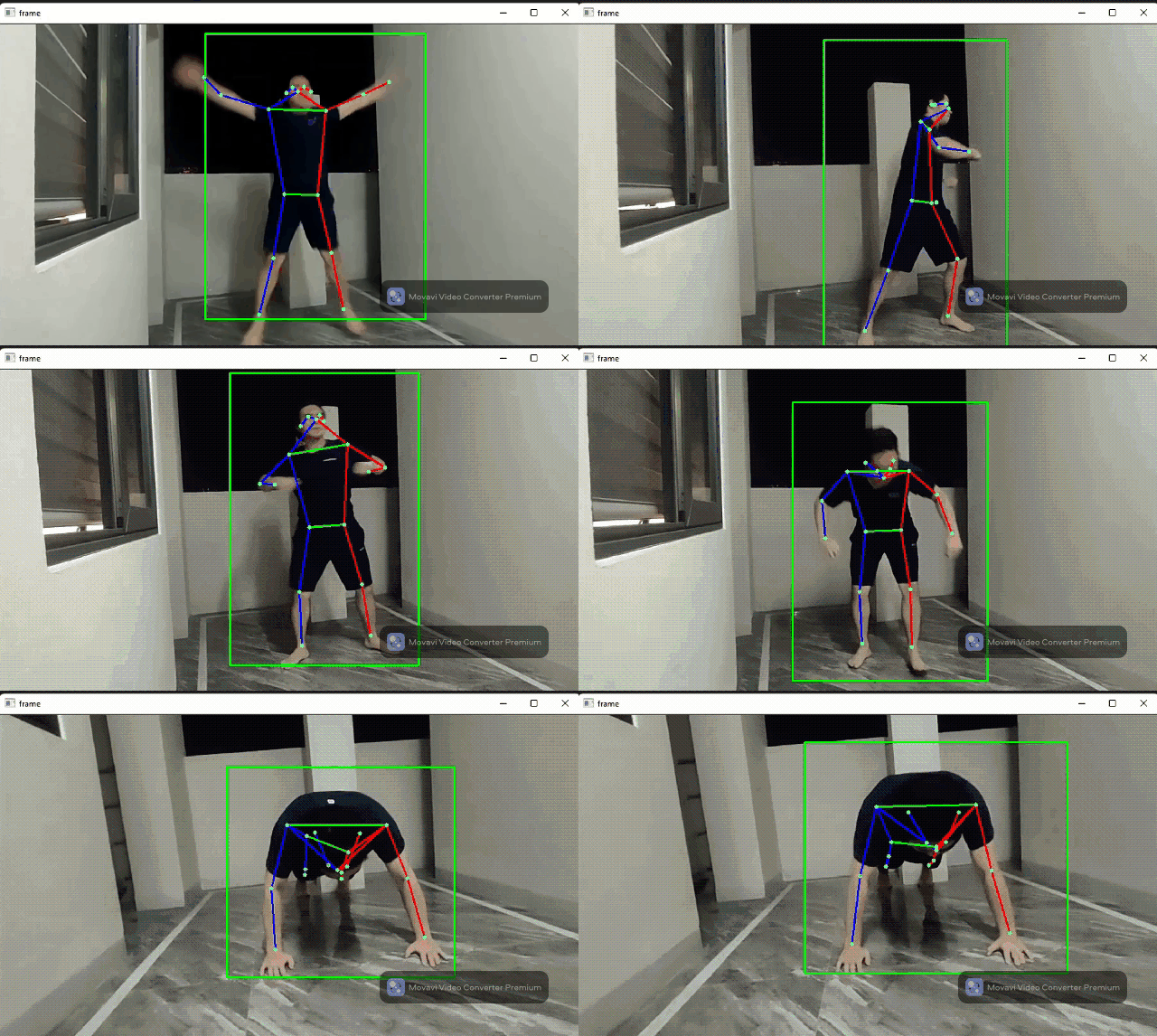
Reading Pose Keypoints
MoveNet outputs 17 keypoints indexed 0–16. The order follows the COCO keypoint convention:
KEYPOINT_NAMES = [
    "nose", "left_eye", "right_eye", "left_ear", "right_ear",
    "left_shoulder", "right_shoulder", "left_elbow", "right_elbow",
    "left_wrist", "right_wrist", "left_hip", "right_hip",
    "left_knee", "right_knee", "left_ankle", "right_ankle",
]

rgb = cv2.cvtColor(frame, cv2.COLOR_BGR2RGB)
poses = flow.Process(rgb)
poses_py = to_py_type(poses)

for person in poses_py:
    keypoints = person.get("keypoints", [])
    for i, kp in enumerate(keypoints):
        if kp.get("score", 0) > 0.3:   # filter low-confidence points
            x, y, score = kp["x"], kp["y"], kp["score"]
            print(f"  {KEYPOINT_NAMES[i]:15s}: ({x:.0f}, {y:.0f})  score={score:.2f}")
Building a Rep Counter (Push-ups)
A practical example using elbow angle to count push-up repetitions:
import cv2, json, math
from daisykit import HumanPoseMoveNetFlow
from daisykit.utils import get_asset_file, to_py_type

def angle(a, b, c):
    """Angle at point b formed by a-b-c."""
    ab = (a[0]-b[0], a[1]-b[1])
    cb = (c[0]-b[0], c[1]-b[1])
    dot = ab[0]*cb[0] + ab[1]*cb[1]
    mag = math.sqrt(ab[0]**2+ab[1]**2) * math.sqrt(cb[0]**2+cb[1]**2)
    if mag == 0:
        return 0
    return math.degrees(math.acos(max(-1, min(1, dot/mag))))

config = { ... }
flow = HumanPoseMoveNetFlow(json.dumps(config))
cap = cv2.VideoCapture(0)
reps = 0
down = False

while True:
    ret, frame = cap.read()
    if not ret:
        break
    rgb = cv2.cvtColor(frame, cv2.COLOR_BGR2RGB)
    poses = flow.Process(rgb)
    flow.DrawResult(rgb, poses)

    poses_py = to_py_type(poses)
    for person in poses_py:
        kps = person.get("keypoints", [])
        if len(kps) >= 11 and all(kps[i]["score"] > 0.3 for i in [5, 7, 9]):
            shoulder = (kps[5]["x"], kps[5]["y"])
            elbow    = (kps[7]["x"], kps[7]["y"])
            wrist    = (kps[9]["x"], kps[9]["y"])
            elbow_angle = angle(shoulder, elbow, wrist)

            if elbow_angle < 90 and not down:
                down = True
            elif elbow_angle > 160 and down:
                reps += 1
                down = False

    display = cv2.cvtColor(rgb, cv2.COLOR_RGB2BGR)
    cv2.putText(display, f"Reps: {reps}", (20, 50),
                cv2.FONT_HERSHEY_SIMPLEX, 1.5, (0, 255, 0), 3)
    cv2.imshow("Push-up Counter", display)
    if cv2.waitKey(1) & 0xFF == ord("q"):
        break

cap.release()
cv2.destroyAllWindows()
# Expected: live skeleton with rep counter that increments each push-up
Applications
- Fitness apps — count reps, measure range of motion, detect bad form
- Sports analytics — track athlete movement and joint angles
- AR games — use body position to control game characters
- Fall detection — trigger alert when a person's keypoints indicate a fall
Conclusion
HumanPoseMoveNetFlow gives you 17-keypoint body skeletons in real time with just a few lines of configuration. Combined with simple geometry (joint angles, distances), it powers fitness counters, pose classifiers, and interactive applications. Next, we use AI to replace video backgrounds.