
Lesson 01: What is DaisyKit?
 Viet-Anh Nguyen
DaisyKit is an open-source AI toolkit that lets you deploy computer vision models in real-time with just a few lines of Python. It wraps powerful models — face detection, human pose, background matting, object detection, and more — behind a simple, consistent API so you can focus on your application instead of model internals.
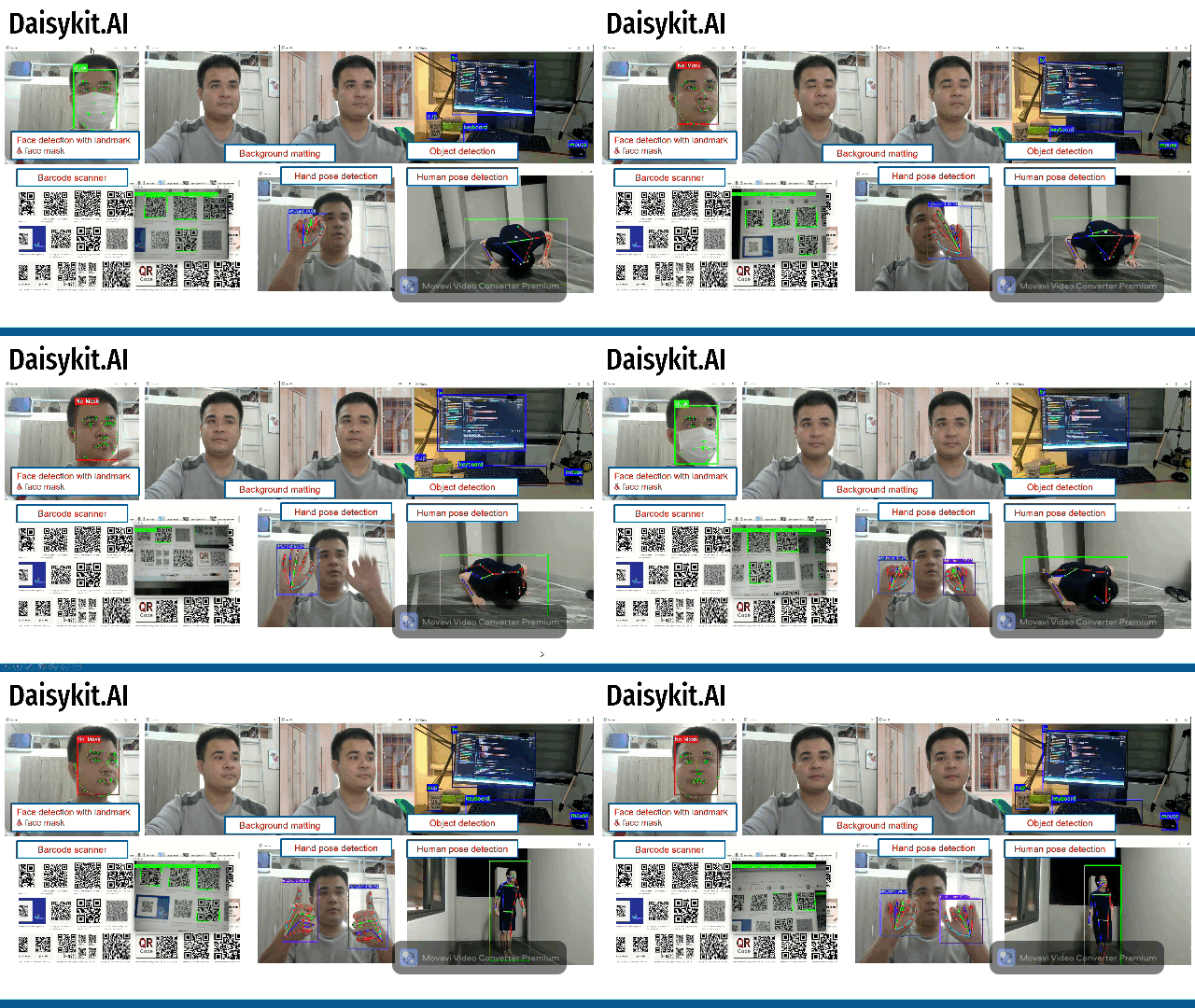
Why DaisyKit?
The typical AI deployment journey looks like this:
- Find a pre-trained model and figure out its input format
- Write preprocessing code (resize, normalize, convert color)
- Run inference with TensorFlow, PyTorch, or ONNX Runtime
- Write postprocessing code (decode predictions, draw boxes)
- Handle edge cases, optimize for speed, repeat for every model
DaisyKit collapses this into two steps: configure and run.
import daisykit, json
from daisykit.utils import get_asset_file

config = {
    "face_detection_model": {
        "model": get_asset_file("models/face_detection/..."),
        ...
    }
}
flow = daisykit.FaceDetectorFlow(json.dumps(config))
faces = flow.Process(frame)        # <- one call for full inference
flow.DrawResult(frame, faces)      # <- one call to visualize
Where DaisyKit Fits
| Framework | Focus | Ease of Use | Custom Models | Multi-platform |
|---|---|---|---|---|
| MediaPipe | Google-curated pipelines | High | Limited | Yes |
| OpenCV DNN | Inference only (no pipelines) | Medium | Yes | Yes |
| TensorFlow Lite | Inference + training | Low | Yes | Yes |
| DaisyKit | Ready-to-run AI flows | Highest | Yes (NCNN) | Yes |
DaisyKit is inspired by MediaPipe's graph architecture but uses NCNN as its inference engine — a lightweight, dependency-free C++ framework that runs on CPU with high efficiency on phones, embedded boards, and laptops.
Graph-Based Pipeline Architecture
DaisyKit organizes AI tasks as directed graphs of processing nodes. Each node does one thing (capture frames, detect faces, regress landmarks, draw results) and passes data to the next node through a transmission queue.
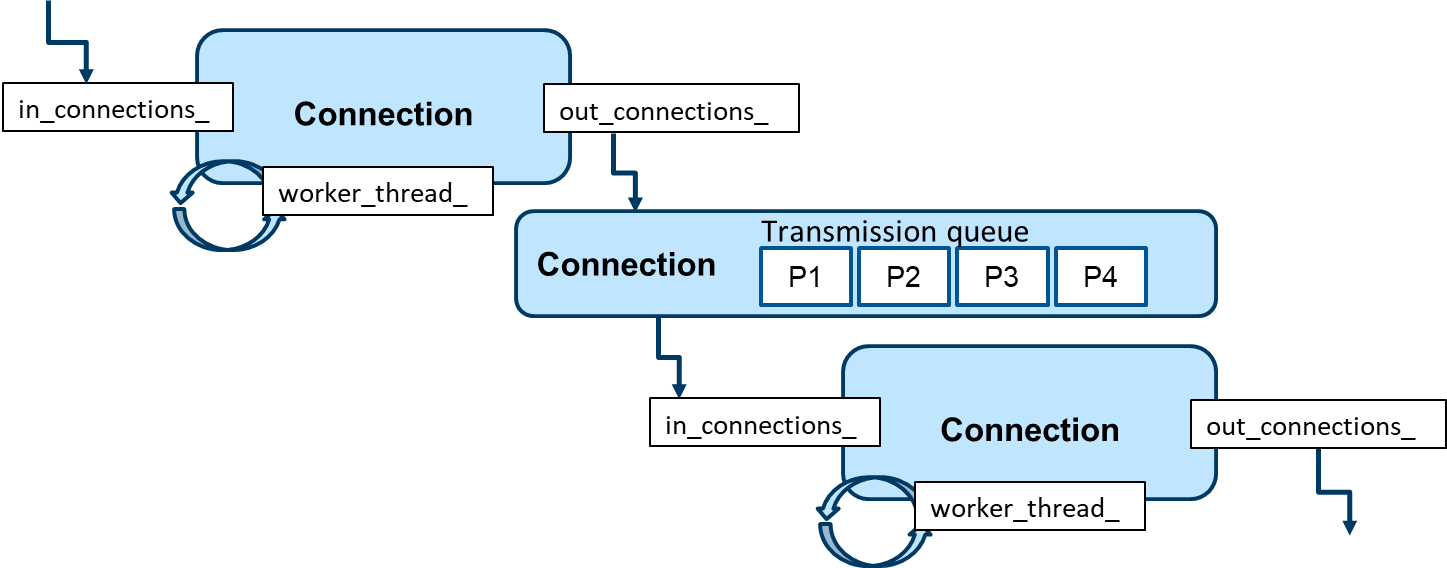
This design has two key benefits:
- Concurrency — nodes run on separate threads, so one node processes frame N while the next is still working on frame N-1. This maximizes throughput.
- Composability — you can swap individual nodes (e.g., replace the face detector with a custom model) without changing the rest of the pipeline.
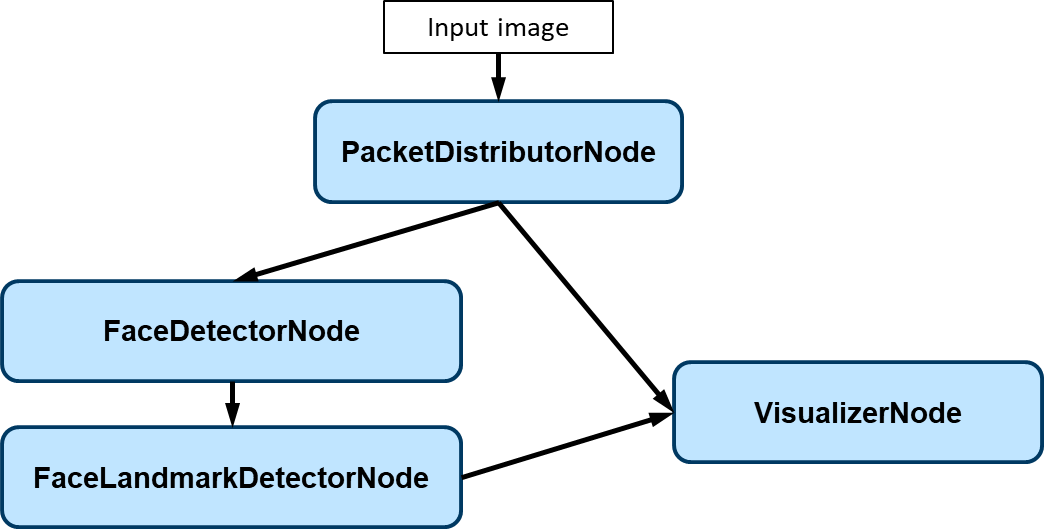
Supported Flows (Python API)
| Flow | Class | Models Used |
|---|---|---|
| Face detection + landmarks | FaceDetectorFlow | YOLO Fastest + PFLD |
| Human pose | HumanPoseMoveNetFlow | SSD-MobileNetV2 + MoveNet |
| Background matting | BackgroundMattingFlow | ERD portrait segmentation |
| Hand pose | HandPoseDetectorFlow | YOLOX hand + Google hand pose |
| Object detection | ObjectDetectorFlow | YOLOX (COCO 80 classes) |
| Barcode / QR scanning | BarcodeScannerFlow | ZXing-CPP (no deep learning) |
Multi-Platform Support
DaisyKit is built on a C++ core that compiles for multiple targets:
- Python — the primary interface for this course (pip install)
- C++ — direct SDK for high-performance systems
- Android — prebuilt AAR with all six demo flows
- iOS — SwiftUI example app
The model weights are platform-agnostic NCNN .param / .bin files, so the same weights run everywhere.
Development Plan
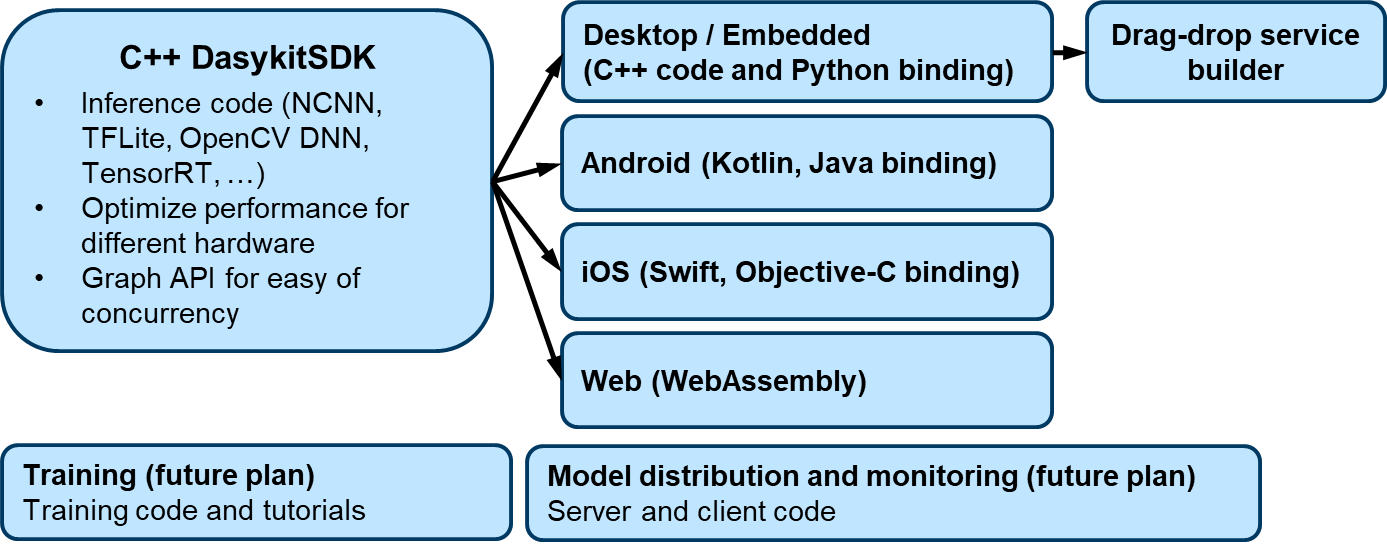
The roadmap covers:
- Phase 1 (current): Inference flows + Python/C++/Android/iOS wrappers
- Phase 2: Training code and tutorials for custom models
- Phase 3: Model distribution hub and monitoring
Key Takeaways
- DaisyKit is a pipeline framework, not just an inference wrapper — models are nodes in a graph that run concurrently for maximum throughput.
- The Python API follows a consistent pattern:
configure → Process() → DrawResult(). - Model weights are auto-downloaded from the asset registry on first use.
- The same flows run on desktop, Android, and iOS with no code changes.
In the next lesson, you will install DaisyKit and run your first AI flow.