Setup Different Fractional Scaling for Different Screens in Ubuntu
· 2 min read · 290 words
Authors

Recently, I needed to configure fractional scaling for two displays: my laptop's 4K screen and my external 2K monitor. I quickly discovered that Ubuntu 24.04 doesn't support different fractional scaling settings across multiple displays. Reference.
Solution:
- Step 1: Upgrade to Ubuntu 24.10. This version replaces X11 with Wayland for NVIDIA graphics cards. Using Wayland as the default display server resolves the fractional scaling issue. After upgrading, remove all existing NVIDIA drivers and install version 570:
sudo apt purge nvidia-\*
sudo apt install nvidia-driver-570
sudo apt install nvidia-cuda-toolkit
sudo apt install nvidia-cudnn
Restart your PC.
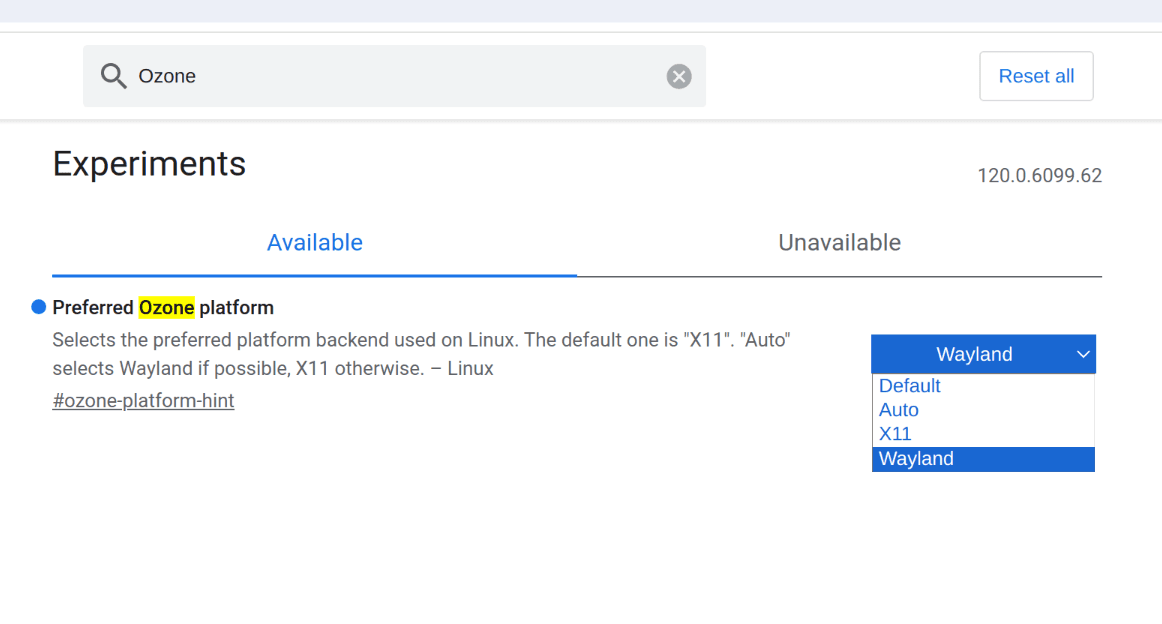
- Step 2: After configuring scaling, you may notice Chrome appears blurry. To fix this:
- Navigate to
chrome://flagsin your Chrome browser - Search for
Preferred Ozone platform - Select
Waylandoption - Restart Chrome
- Navigate to
-
Step 3 (optional): Fix bug
nvidia-smieating all your RAM, then being killed (2025/05/09):- This is a very weird bug of
nvidia-smithat ate all my RAM > https://forums.developer.nvidia.com/t/nvidia-smi-uses-all-of-ram-and-swap/295639. - Fix this: You can use
sudo chmod o-w /var/run/nvidia-persistenced/socketto fix it temporarily. - For persistent workaround:
sudo mv /usr/bin/nvidia-smi /usr/bin/nvidia-smi-bug
sudo nano /usr/bin/nvidia-smi
then paste:
#!/bin/bash

sudo chmod o-w /var/run/nvidia-persistenced/socket
nvidia-smi-bug
Ctrl+x to save, then
sudo chmod +x /usr/bin/nvidia-smiNow you can run
nvidia-smias usual, but it requires root permission. - This is a very weird bug of
Done! Enjoy your fractional scaling! :D