
Lesson 04: SAM Auto-Labeling
 Viet-Anh Nguyen
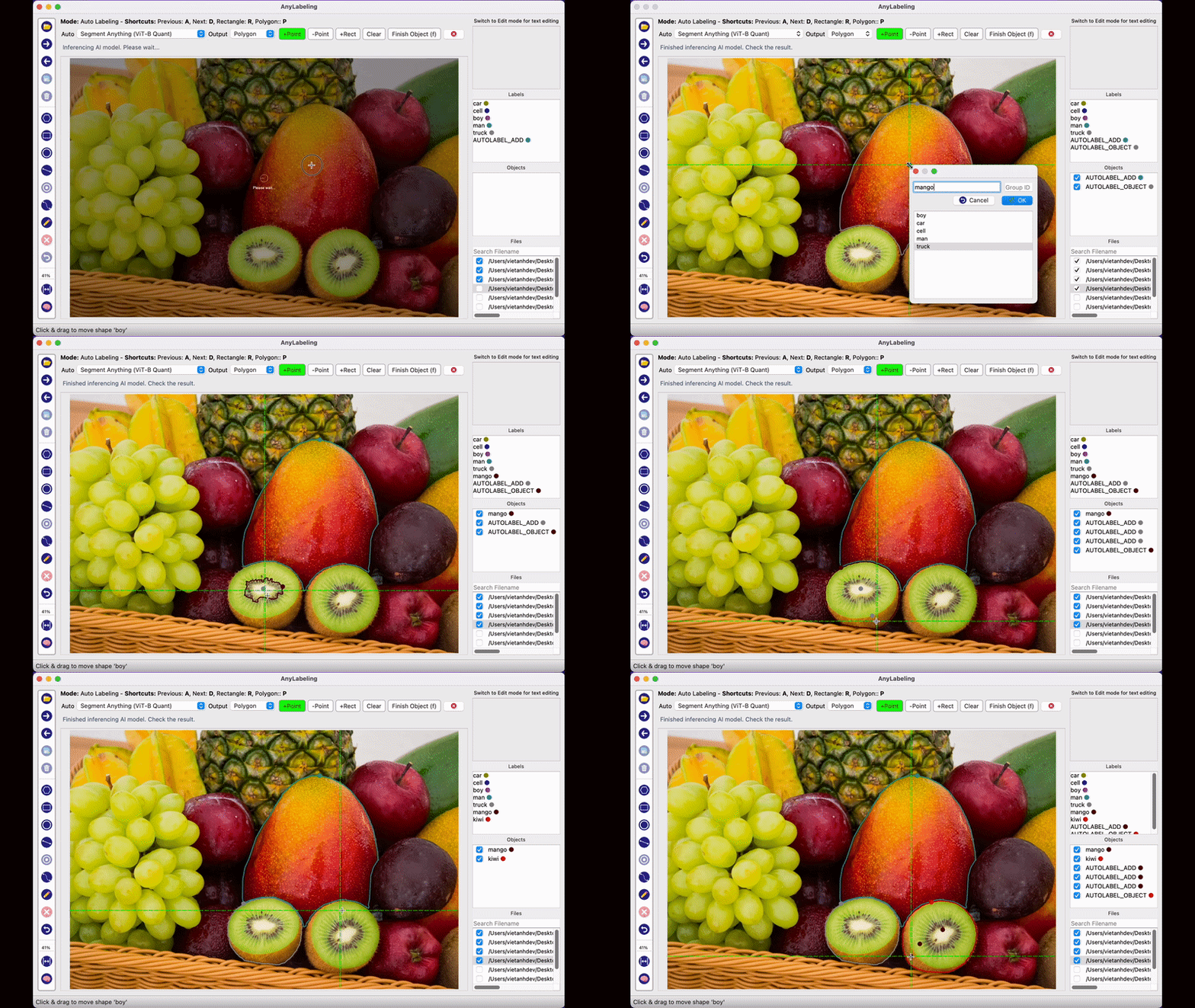
Drawing a polygon around a dog takes 30-45 seconds. Clicking once on the dog and letting Segment Anything generate the polygon takes 2-3 seconds. That is the promise of SAM auto-labeling, and in practice it delivers.
Supported SAM Variants
AnyLabeling ships with the full Segment Anything family. Each model auto-downloads from Hugging Face on first use.
| Model | Sizes | Input Prompts | Speed | Accuracy | Best For |
|---|---|---|---|---|---|
| SAM (original) | ViT-B, ViT-L, ViT-H | Points, Rectangles | Slow-Medium | High | Maximum accuracy, batch jobs |
| SAM (quantized) | ViT-B, ViT-L, ViT-H | Points, Rectangles | Medium | Good | CPU annotation without GPU |
| MobileSAM | Single variant | Points, Rectangles | Fast | Good | Real-time CPU annotation |
| SAM 2 | Hiera-T, S, B+, L | Points, Rectangles | Medium | Higher | Images and video frames |
| SAM 2.1 | Hiera-T, S, B+, L | Points, Rectangles | Medium | Highest | Best overall image segmentation |
| SAM 3 | ViT-H | Text, Points, Rectangles | Slow | Highest | Open-vocabulary, text-driven detection |
Which one should you start with? MobileSAM if you are on CPU. SAM 2.1 Hiera-B+ if you have a GPU. SAM 3 if you need text-driven segmentation.
Activating Auto-Labeling
- Click the brain icon on the left toolbar, or press
Ctrl + A. - A dropdown appears at the top of the tool panel. Select your SAM model.
- Wait for the model to download (first time only) and load.
- The toolbar changes to show SAM-specific tools:
+Point,-Point,+Rect,Clear, andFinish Object (f).
For a visual reference of the SAM toolbar, see the AnyLabeling SAM documentation.
First-time patience: The ViT-H encoder is about 2.4 GB. First download takes a few minutes on a typical connection. Subsequent launches use the cached model instantly.
Prompt Types
Point Prompts (+Point / -Point)
The simplest way to segment an object:
- Select
+Pointfrom the SAM toolbar. - Click anywhere inside the object you want to segment.
- SAM generates a mask immediately.
- If the mask is too small (missed part of the object), click another
+Pointon the missed region. - If the mask includes unwanted area, switch to
-Pointand click on the area to exclude. - Press
fto finish. Type the label name and confirm.
How it works under the hood: The encoder processes the entire image once and caches the embedding. Each point prompt runs only the lightweight decoder against the cached embedding, which is why subsequent clicks feel instant. See the SAM architecture paper for the full details.
For the full architecture diagram, see the SAM paper (Kirillov et al., 2023).
Tips:
- Start with a single point near the center of the object. SAM's center bias means center clicks produce the best initial masks.
- One
+Pointis often enough for well-separated objects. Save multi-point prompting for complex cases. -Pointis powerful for excluding background that SAM incorrectly included. A single exclusion point often fixes an otherwise perfect mask.
Rectangle Prompts (+Rect)
Draw a bounding box and SAM fills in the segmentation mask:
- Select
+Rectfrom the SAM toolbar. - Draw a rectangle around the object (same as manual bounding box).
- SAM generates the segmentation mask within the rectangle.
- Press
fto finish and label.
When to use Rect over Point: When the object is surrounded by similar objects (e.g., one car in a parking lot). The rectangle constrains SAM's attention to a specific region, reducing ambiguity.
Text Prompts (SAM 3 Only)
SAM 3 introduces open-vocabulary segmentation — describe what you want and SAM finds and segments it:
- Select SAM 3 ViT-H from the model dropdown.
- Select the
Textprompt tool. - Type a description:
truck,red car,person wearing a hat. - SAM 3 detects and segments all matching objects.
- Review each detection, press
fto accept, or delete to reject.
This is the future of annotation. Instead of clicking on every instance, you describe the class and the model finds them all. The accuracy depends on the specificity of your prompt — truck works better than vehicle, and yellow school bus works better than bus.
The SAM Annotation Workflow
Here is the workflow pattern that maximizes speed:
For each image:
  1. Encoder processes the image (automatic, ~1-3 seconds)
  2. For each object:
     a. Click +Point on the object center
     b. If mask is wrong: add +Point or -Point to correct
     c. Press f to finish
     d. Type label (or press Enter for same label as last)
  3. Press D to go to next image
The encoder cache means step 1 only happens once per image. Steps 2a-2d take 2-5 seconds per object. Compare that to 30-90 seconds per polygon with manual annotation.
Image Embedding Cache
AnyLabeling caches the last 10 image embeddings in memory (LRU cache). This means:
- Navigating back to a recently viewed image is instant — no re-encoding.
- The cache size is fixed at 10 images by default. On a machine with limited RAM, SAM ViT-H embeddings (~50 MB each) can consume significant memory.
- When you switch to a different SAM model, the cache is cleared because embeddings are model-specific.
Choosing the Right Model for Your Task
Large objects, clear boundaries (cars, buildings, furniture): MobileSAM or SAM 2.1 Hiera-T. Fast inference, and the segmentation quality is excellent for well-defined objects.
Small objects, cluttered scenes (screws in a factory, cells in microscopy): SAM 2.1 Hiera-B+ or Hiera-L. The larger models handle ambiguity better and produce tighter masks on small objects.
Multiple instances of the same class: SAM 3 with text prompts. Type the class name once and get all instances. Then review and correct.
Sequential images (e.g., video frame exports): SAM 2 or SAM 2.1. These models were designed with temporal understanding in mind, so they tend to produce more consistent masks across sequential frames from the same scene. Note that AnyLabeling currently works with individual images — load your video frames as an image directory.
Common Pitfalls
Over-prompting. Adding too many points confuses the decoder. If a single point gives a bad mask, try a rectangle prompt instead of adding five corrective points.
Wrong model for the hardware. Running ViT-H on a CPU laptop will give you 5-10 second encoder times per image. Use MobileSAM or the quantized variants instead.
Not using -Point. Many annotators only use +Point and accept imperfect masks. A single -Point on an incorrectly included region is faster than re-drawing.
Forgetting to press f. If you navigate to the next image without pressing f (Finish Object), the current SAM mask is discarded. Always finish before moving on.
Performance Benchmarks
Rough encoder times on a single image (1280x720):
| Model | CPU (i7-12700) | GPU (RTX 3060) |
|---|---|---|
| MobileSAM | ~0.5s | ~0.1s |
| SAM ViT-B | ~3s | ~0.3s |
| SAM 2.1 Hiera-B+ | ~2s | ~0.2s |
| SAM ViT-H | ~8s | ~0.5s |
| SAM 3 ViT-H | ~10s | ~0.8s |
Decoder times (per prompt) are negligible — under 50ms on CPU for all variants.
Key Takeaways
- SAM turns segmentation annotation from a 30-90 second task into a 2-5 second task.
- Start with MobileSAM (CPU) or SAM 2.1 Hiera-B+ (GPU) for most tasks.
- Use SAM 3 text prompts when you need to find all instances of a class without clicking each one.
- The encoder runs once per image; the decoder runs per prompt. This is why multi-point correction is cheap.
- Always press
fto finish an object before moving on.
In the next lesson, we use YOLO for a different kind of auto-labeling — automatic bounding box detection across your entire dataset.