
Ship fast, verify fresh: how I code with AI agents across projects
· 12 min read · 2354 words

I usually have a few projects going at once. An agent works on one while I work on another. When I switch back, I have three questions. Which commit did it test? What did it check? Does it need a decision from me?
This post is how I answer them. I’ll walk through the tools I use every day, a few numbers from my own logs, and the habits that keep bugs down while several agents write code.
ppStack is my own set of agent skills, inspired by Garry Tan’s gstack, which packages his Claude Code setup as a set of tools. I wrote the first version a long time ago. It started as skills I ran one at a time in Claude Code and Codex. I recently connected them. Now one brief goes from the first edit to an independent check, and the test results stay beside the code. gstack
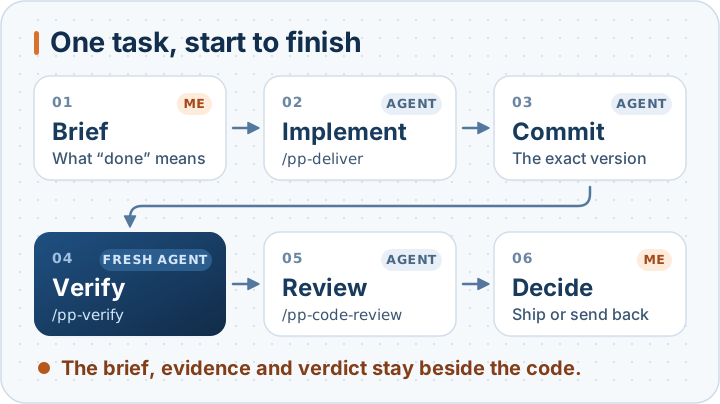
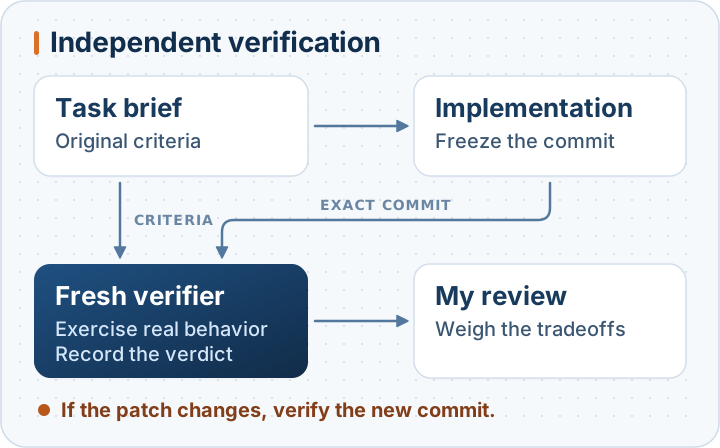
If you only remember one picture from this post, make it this one. I write the brief and make the last call. Agents do the four steps in between, and a different session does the checking.
In July I wrote about review becoming the bottleneck as agents took on more implementation. Having several changes underway at once made that problem harder to ignore. The Bottleneck Moved to Review
I kept giving agents the same instructions
I had a routine long before agents. Reproduce the bug before fixing it. Measure how fast something is before trying to speed it up. When I started handing work to agents, I caught myself typing the same reminders again and again. Test the change and show me what happened. If it touches the UI, open the app and look at the screen.
I’ve been moving those reminders into ppStack a little at a time. A project’s verification steps can tell the agent how to start the app, what to try, and what to save. For a layout change, I want to see the screen. For a change to Save, I want the agent to click it and check that the data was saved.
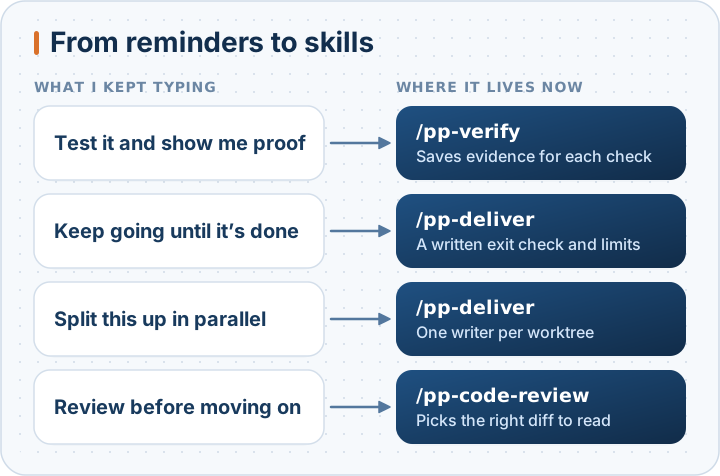
I also kept asking agents to stick with a task until it was done. If a task will run while I’m away, the brief names the command to run and the result that counts as done. The playbook sets time and attempt limits. The project’s checks have to pass on the starting commit before the run begins.
The work runs on different machines
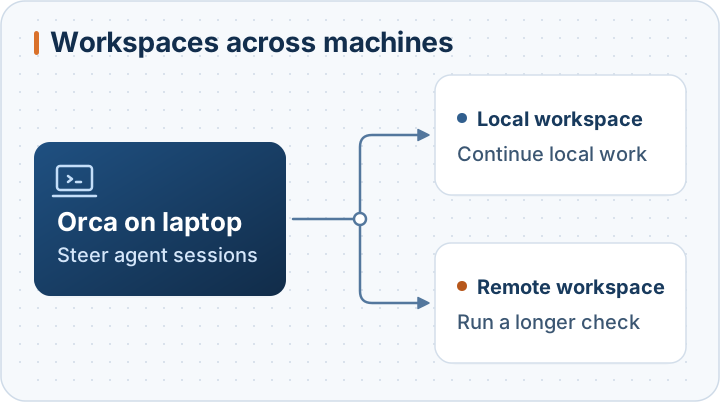
I work across Linux, macOS, and Windows with WSL, and I keep two separate accounts for different sets of projects. In Orca I pick the machine for each task. I can leave a long check running on another machine, do something else on my laptop, and return to the same workspace to see the output or answer a question. Orca’s remote workspaces
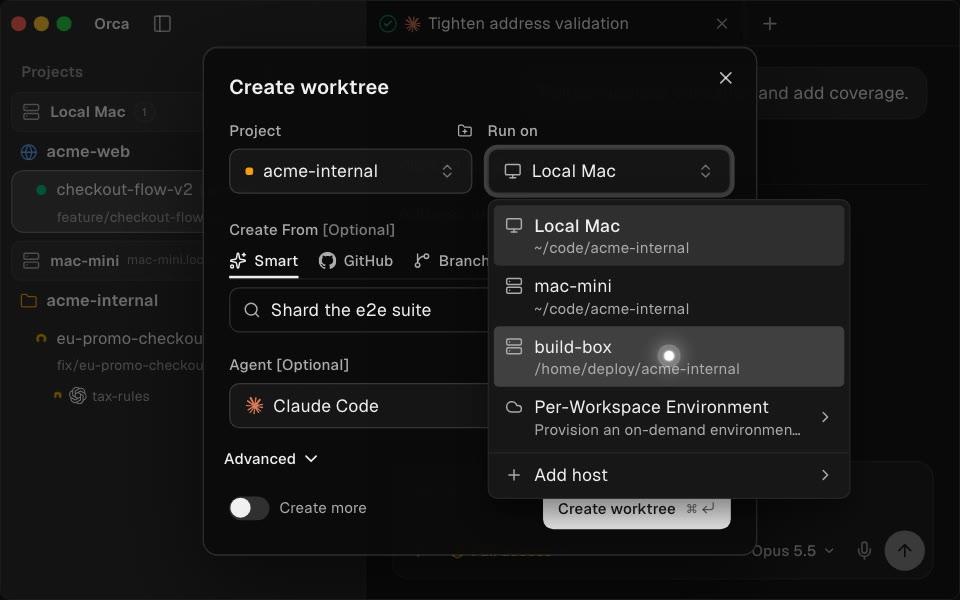
Choosing where to run a worktree in Orca’s public demo. Screenshot from the Orca repository

I often ask agents to split up work that can run in parallel. ppStack gives each worktree one writer. A CLI fix and a blog update can go ahead at the same time. If two changes touch the same API, I settle how it should work for existing callers before splitting the work. The agent’s sandbox controls which files and credentials it can access.
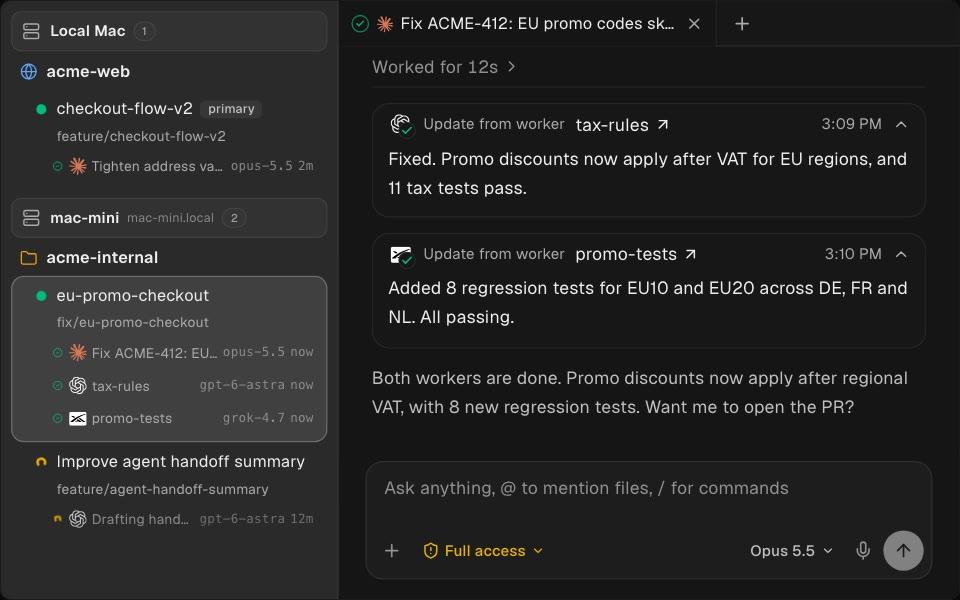
Worktrees and agent updates in Orca’s public demo. Screenshot from the Orca repository

Coming back meant rereading transcripts
To see how much switching I really do, I counted my local Claude Code history from 7 to 20 November. One account was active on 12 of the 14 days and the other on all 14. On a typical active day I had about eight sessions on the first and six or seven on the second. I counted a session once per day if it got an input, which could be a quick question or a long coding task.
The sessions were spread out, too. On a typical active day they touched eight working folders on the first account and four on the second. A working folder is a repo or one of its worktrees. Some of those sessions were started by another agent that was coordinating the work, so treat the numbers as a rough picture of my days.
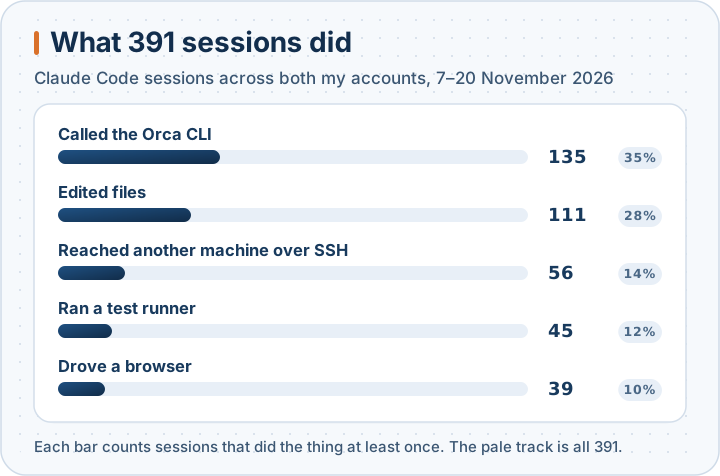
The chart adds up both accounts: 391 sessions in those two weeks. About a third called the Orca CLI, and 56 reached another machine over SSH. Thirty-nine opened a browser, which is the old “look at the screen” reminder happening without me typing it. With that many sessions in that many folders, I want one place to look up what happened.
I used to keep task records in a local service with a web app and an Orca panel. It took too much work to maintain. In 4.0 I moved the records into a .ppstack/ folder beside the code. I can open it in any editor or use the optional ppStack Reader in Orca.
| File | What I can recover when I come back |
|---|---|
task.md | The request, any later corrections, and the acceptance criteria |
steps.md | The playbook steps and which ones have evidence |
evidence/ | Command output, screenshots, or other artifacts from the checks |
report.md | The verification verdict and gaps in coverage |
handoff.md | The tested revision and the next action |
I can start a fresh session in the worktree, even with a different agent, and pick up from the handoff. Git ignores the task folder. Everyone else can see the summary, checks, result, and commit in the pull request. If I move the task to another machine, ppStack can carry over the branch and the shared task files.
A passing test can still miss the bug
Here’s the failure I worry about most. An agent fixes one part of a bug, writes a test that passes, and misses what I asked for. So I want a second session to check the change against the original request.
When I start /pp-deliver, I write down what needs to change, what the agent may edit or publish, and how we’ll know it works. For a bug, the agent reproduces it, fixes it, and runs the relevant checks. Then it commits the version I’ll hand over for verification.
I use a fresh /pp-verify session to reduce confirmation bias. Take a retry bug. The agent that wrote the fix may see two successful responses and stop there. I want the verifier to check that the two requests wrote only one record. Even with the same model, a fresh session can start from the brief, the exact commit, and the repo instructions. It can choose what to check before seeing the first agent’s verdict.
The verifier tries the change through the CLI, API, or UI. It records the command, exit status, what happened, and the commit. If a required check can’t run, the task stays blocked. If the patch changes, we rerun the affected checks. I also kept asking for a review before moving on. Now /pp-code-review picks the right diff and looks for problems outside the test cases. I still decide things like whether to break compatibility or ship a change on its own.
How deep the check goes depends on the change. A copy edit needs a quick look at the page. A change to how data is saved needs a check that the data is still there after a reload. While a longer check runs, I can review another project or answer a question someone is waiting on. If I’m already behind on reviews, starting another agent gives me one more patch to read.
I’d been working this way for some time when I explored pstack and found a similar idea. Its creator, Lauren Tan, is on the React Compiler core team and worked on the Grok Bot desktop app at SpaceXSI. She turned her own routines into playbooks and reusable skills. In pstack, /poteto-mode picks a playbook for the job and calls the skills it needs. Lauren Tan at AI Engineer · pstack
Can I ship faster and still catch bugs?
This is the fair question to ask. More patches give me more chances to miss a regression. In All Code Is Slop (Except Mine), Tan describes how the Grok Bot team handled that problem as its output grew. For its Electron app, the team gave main-process and renderer code separate directories and added a static check for imports across that boundary. A bad import fails before it reaches a reviewer. The team also gave agents a way to run the app and collect evidence from real interactions. Lauren Tan at AI Engineer
| Grok Bot team, 2026 | June | October |
|---|---|---|
| Merged pull requests | 809 | 10,926 |
| Contributors with at least one PR | 15 | 227 |
| Share of commits reverted | 0.98% | 0.47% |
Slides on merged PRs · Contributors · Reverts
The team merged about 13.5 times as many PRs in October as in June. The app got faster in some ways and heavier in others. From the May baseline to the measurements in the talk, cold launch fell from 2,304 to 1,395 ms and median typing latency in a long chat fell from 8.4 to 2.9 ms. Idle memory rose from 488 to 545 MiB. Client performance slide
These are the team’s own measurements. Many more people contributed by October, and the share of code written by AI is unknown. Revert counts can miss bugs fixed in a later PR. Tan describes how the team tests each new build and opens PRs for the bugs it finds. Those fixes can improve the app without showing up as reverts. Release testing in Tan’s talk
What I take from the talk is that I can ask an agent to write the regression test, too. A tricky case I might have tested by hand once can become a check that runs every time. That could help me ship faster and catch more bugs before release. For my own projects, I’d measure the time from brief to verified change and count regressions found after release, including ones we fix in a later PR.
Some decisions still need me
A few more skills come up most weeks. When I’m new to part of a codebase, I use /pp-investigate to see how it works and why it was built that way. For a decision that’s hard to undo, /pp-system-design helps me think through the constraints and what might go wrong. When I need to know what a dependency promises, /pp-deep-research takes me to the primary sources.
Orca shows me which session owns a change and which one is checking it. A verification report needs enough detail for someone else to reproduce the result.
I’ve also changed how I make diagrams. My older posts used Mermaid. It’s quick to write, but the layout engine decides where everything goes, and the result looks like every other Mermaid chart. Now I ask an agent for an SVG file. It can edit the file directly, render it to an image, look at the result, and fix a label that runs outside its box. The diagrams in this post were made that way, and I think they look better than what I used to get.
One coding habit hasn’t changed. I look for the code that already does the job and try to change it there. That keeps the patch smaller and makes it easier to check what happens to existing callers. A second implementation can leave me with two places to fix the same bug.
For ML work, /pp-model-training starts with the checkpoint and run artifacts. I want to know what architecture actually trained, what weights loaded, and which data it saw. If initialization silently falls back, the job can finish and give me a perfectly plausible number for a different experiment.
A verifier can tell me what happens after a retry. I still have to decide what the caller should see. When I get back to a project, that’s the kind of question I want waiting for me, with the commit and the test result right there.
If you want to try this yourself, start small. Pick one reminder you keep typing to your agent and write it down where the agent will read it every time. That’s how ppStack started.
Keep reading
- The Bottleneck Moved to Review: My SDLC After AI Writes Most of the Code
When a machine writes most of your diff, the constraint stops being how fast you type and becomes how well you review. Here is the SDLC I actually run (the provenance audit, the sandbox, the CI backstops, and the three questions I ask every AI-authored change) plus the parts of review that don't compress and never will.
- Version One Is Cheap Now. What ArtCraft's AI-Built Clones Teach Software Engineers
In two weeks, one small team used coding agents to publish open-source reimplementations of Photoshop, Premiere, Acrobat, Word and Excel. I read the repositories to see how they were built, how far along they really are, and what commercial users still depend on. My conclusion: version one of software is becoming cheap, and the valuable work moves to fit, verification, support and risk.
- AI Can Write the Code. But Code Was Writing Us.
Writing software helped shape how we think as engineers. As AI takes over more implementation, I worry about discovery debt: the questions and insights we miss when we skip the work that might have revealed them. Here is how I want to preserve understanding, curiosity, and judgment while working with coding agents.