
Make Your CI Actually Launch Your Linux Desktop App
· 8 min read · 1426 words

My Flatpak build was green, and so was every check around it. flatpak-builder exited 0, the bundle carried the whole rule pack, the CLI inside the sandbox listed every rule correctly, and across the other packages every shared library resolved.
Then I ran flatpak run com.vietanhdev.bulwark. It printed one line — couldn't find a 'rules' directory — and immediately died in a panic from inside libappindicator-sys, which dlopens a tray library the GNOME runtime does not ship.
Dead on arrival, and two bugs deep: the panic, plus a rule pack the app couldn't locate, which had already silently disabled its background monitoring. Nothing in the pipeline was broken. Every check was measuring a build, and the failure was in a program.
Why every check missed it
The app is Bulwark (source) — a Linux security scanner, shipped as a Tauri desktop app and a CLI across .deb, .rpm, AppImage, tarball, a PPA, the AUR and COPR, plus Snap and Flatpak builds that CI exercises on the way to the Snap Store and Flathub. That spread is the real reason any of this matters: every one of those formats resolves resource paths, links libraries and sandboxes differently, so "it works on my machine" covers a small fraction of the surface — and the two sandboxed ones are where nearly every bug in this note came from.
It ships two binaries in one package: the GUI, and a CLI sidecar it shells out to for privileged work. They share a directory and not one line of code.
Every check I had drove the CLI. "The .deb contains 65 rule files", "the AppImage's linkage resolves", "the sandboxed CLI lists all rules" — all true of a build whose GUI could not start. I verified one artifact and quietly inferred the other.
A structural check cannot catch a binary that dies before it draws a window.
The fix: make CI open the window
docker run --rm -v "$PWD/dist:/dist:ro" ubuntu:24.04 bash -c '
  set -eu
  apt-get update -qq
  apt-get install -y -qq xvfb imagemagick x11-apps
  apt-get install -y -qq /dist/bulwark-desktop_*_amd64.deb   # not dpkg -i
  export DISPLAY=:99
  Xvfb :99 -screen 0 1280x800x24 &
  sleep 3
  bulwark-app > /tmp/app.log 2>&1 &
  sleep 20
  if grep -qi panicked /tmp/app.log; then echo "FAIL: panicked"; exit 1; fi
  import -window root /tmp/shot.png
  identify -format "%k" /tmp/shot.png   # distinct colours
'
Two things matter here.
Use apt-get install ./file.deb, not dpkg -i. dpkg -i leaves a half-configured package when a dependency can't be satisfied and lets the test carry on against a broken install. apt-get fails properly.
And count distinct colours in a screenshot. A blank window scores a handful; a rendered UI scores hundreds. That one line catches the "process alive, window empty" failure that no log-based check can see — which is exactly the bug I hit next, when a sandbox refused a D-Bus name and the app came up as a transparent rectangle.
Then arm64 showed the colour count was a lie
The colour count is satisfiable by an app running no application code at all. WebKit paints a background and chrome, scores 2000-odd colours, passes.
That matters more than it sounds once you add an architecture, because JavaScriptCore has its own arm64 JIT. To be clear, I never hit a JIT bug — but "the native shell renders while the JavaScript never runs" is precisely the shape of failure that would be architecture-specific, and it produces a plausibly-coloured, plausibly-sized, completely useless window. The colour count cannot see it by construction, and I would rather not learn that from someone else's machine.
So I stopped asking "are there pixels" and asked narrower questions:
The renderer-process check (pgrep -f WebKitWebProcess) is the cheapest one here, and it directly detects the failure that actually shipped: a shell running with no web engine behind it. The OCR check is the one that proves the app ran rather than that the engine painted — keep it lenient about which text, or every copy change becomes a release blocker.
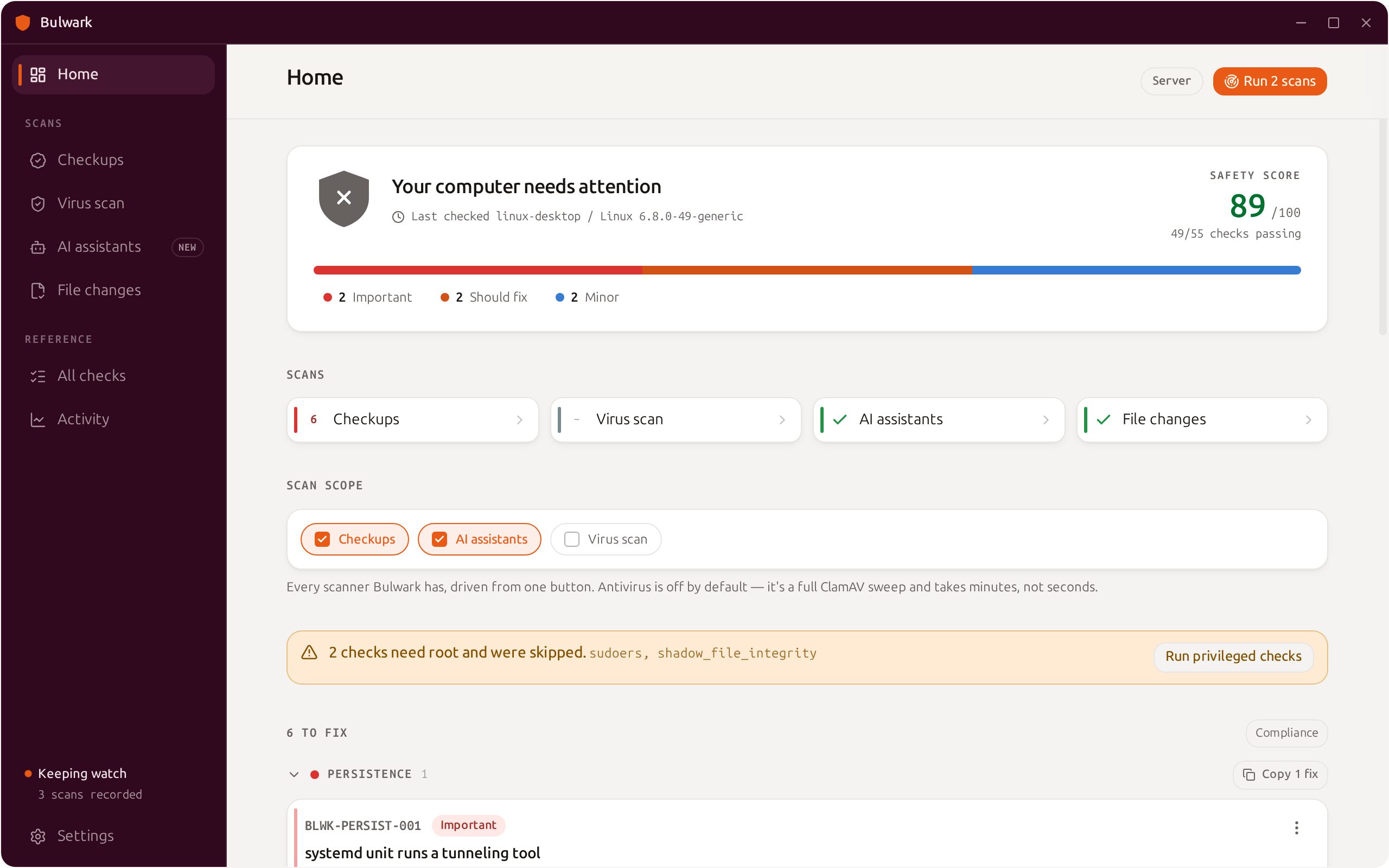
What CI has to see. Words like "Checkups", "Scans" and "Settings" are what the OCR check reads back — the difference between a window that rendered and a window that merely exists.
Two of my new checks could not fail
This is the part worth stealing. On the first CI run, two of those new checks were broken — one incapable of passing, one incapable of failing. The renderer-process and OCR checks were fine.
The window check failed everywhere, on an app rendering perfectly. There's no window manager under Xvfb, GTK maps small helper windows with the same name, and I'd written xdotool search --name Bulwark | head -1. Printing every candidate gave it away instantly:
candidate window 2097153: 10x10
candidate window 2097155: 1280x800
candidate window 2097179: 16x16
head -1 was measuring a 10x10 helper and calling a healthy 1280x800 UI unusably small.
The baseline-diff check was worse, because it looked like it was passing. compare -metric AE prints 1023970 (0.999969), not a bare integer. My parser saw a non-number, took the "can't measure" branch, and emitted a warning. It had never once executed — and in the logs that is indistinguishable from a check that ran.
I made the same mistake a third time that afternoon, outside the harness entirely: verifying the test suite locally, I ran cargo test --workspace | tail -25, saw exit 0, and called it green. The exit code of a pipeline is the exit code of its last command. I had measured tail.
So: verify a new check by deliberately breaking the thing it guards. I did that for my packaging assertions — narrowed an architecture list, deleted a required key — and each went red on cue. I skipped it for the GUI checks, and two of them were broken.
Bonus: emulation only lies in one direction
Testing arm64 under qemu, the frontend build failed with Cannot find module '@rolldown/binding-linux-arm64-gnu' — reproducible and convincing. The lockfile had the binding; npm skipped it, logged reify failed optional dependency, and exited 0 because optional failures aren't errors.
On a native arm64 runner the same commit built fine. A success under emulation is evidence; a failure is not, because you can't separate a broken build from a broken emulator.
What it costs
One bash script and a Docker run per target. No test framework, no Selenium, no display server on the runner.
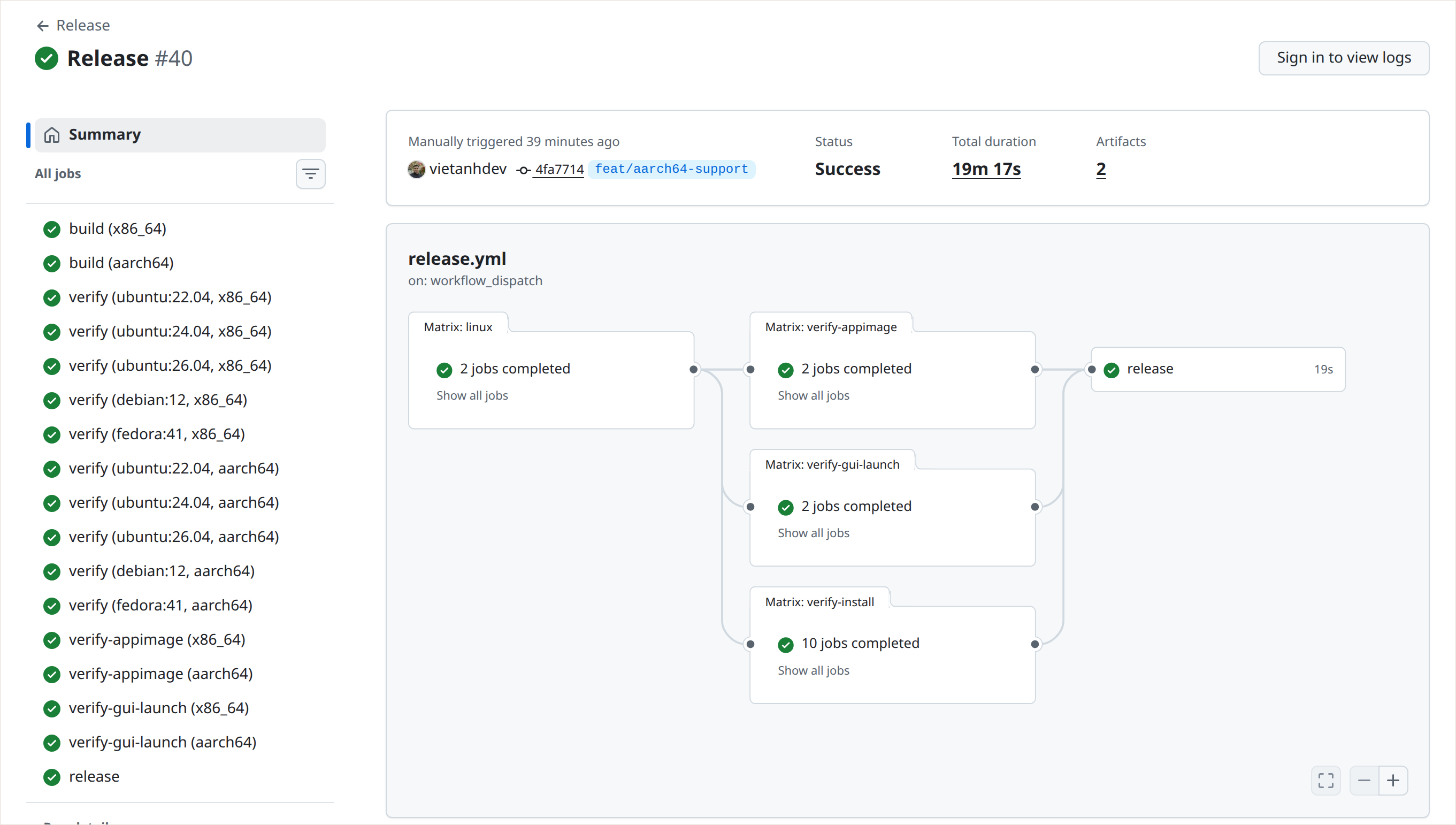
Seventeen jobs, both architectures, 19 minutes. The two verify-gui-launch rows start the real
GUI and screenshot it.
The launch tests take about ten minutes on x86_64 and thirteen on arm64, running in parallel with everything else. That is the whole price of the difference between "the build is green" and "a user who installs this gets a working app."
Your CI almost certainly does not launch your desktop app. The twenty lines that do will find something. Mine would have caught every one of the bugs I shipped in that Flatpak — I found those by hand, which is the expensive way — and the first time I ran the hardened version, it turned up two more bugs in its own code.