Results from Segment Anything Model - Source: Meta.
## 2. Use Labelme as the base [Labelme](https://github.com/wkentaro/labelme) is a very popular labeling tool with over 10k stars on GitHub. It is written in Python and Qt and supports many image formats. It can also be modified very easily to integrate new features. Therefore, I decided to use it as the base for **AnyLabeling**. I also made some changes to the original **Labelme** to improve it: - Re-designed the UI to make it look more modern and user-friendly. - Added architecture for model inference. Currently, I have integrated Segment Anything and YOLO models. - Added OCR labeling. You can now label text in images or group text boxes. - Switched to [PEP8](https://peps.python.org/pep-0008/) style for Python code. This is only a personal preference and does not affect the functionality of the tool. However, I spent a lot of time refactoring the code to make it comply with PEP8 (because Labelme uses another style). 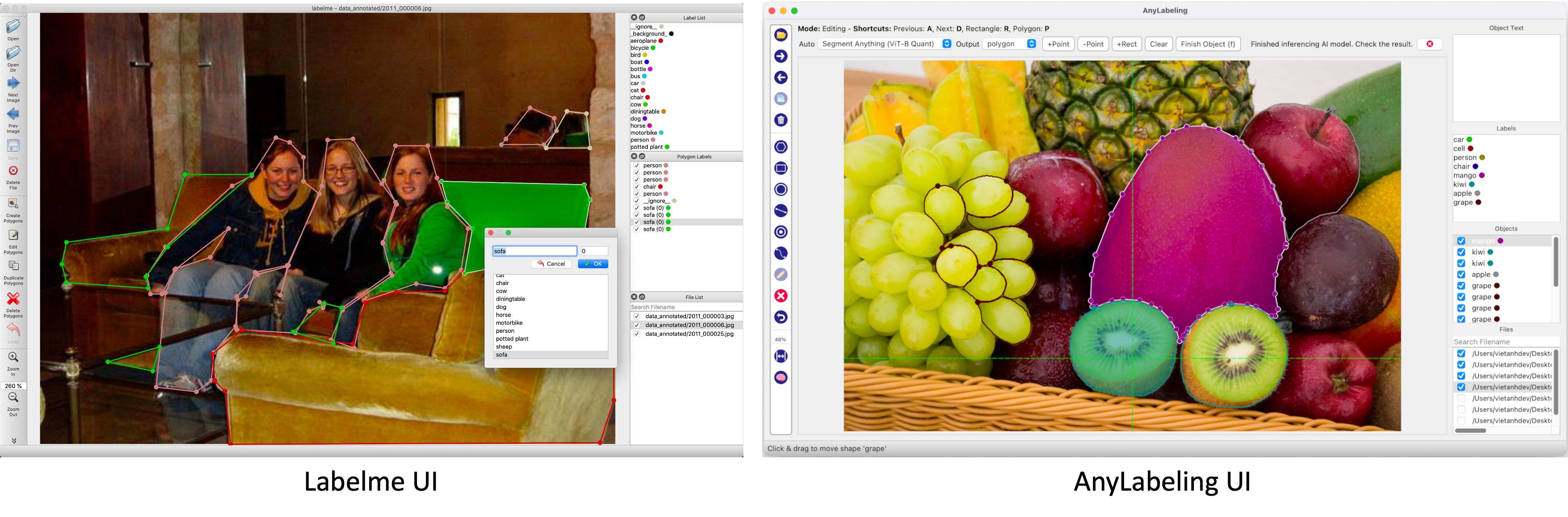UI and icons have been re-designed in AnyLabeling for a modern looking.
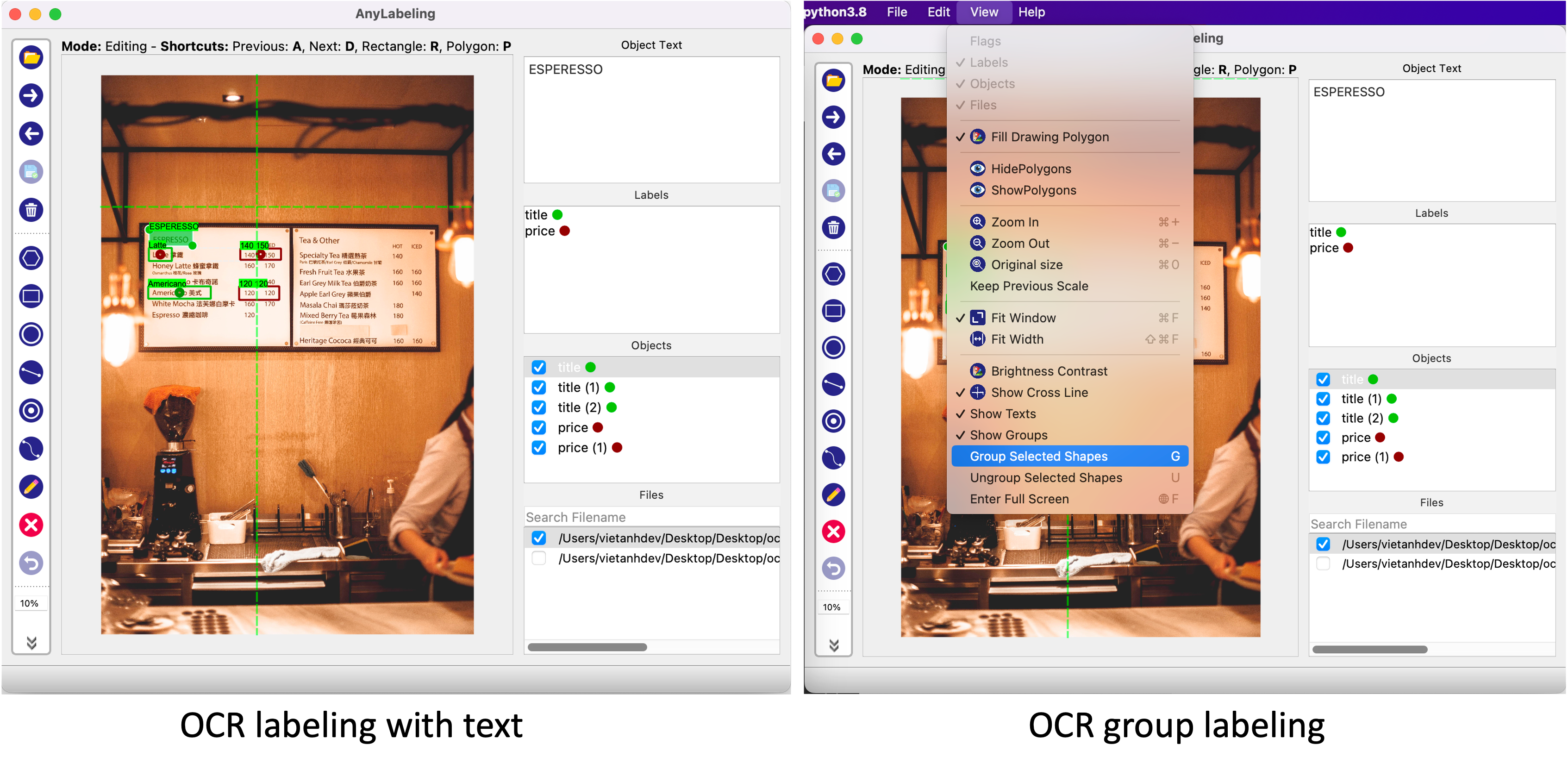Text OCR labeling in AnyLabeling.
## 3. Model inference Adding model inference is a key to automate labeling tasks. The early version of AnyLabeling supports Segment Anything and YOLO models. The Segment Anything models and the first YOLOv5 model were added. Other YOLOv5 and YOLOv8 models were added by [Henry](https://github.com/hdnh2006). The model inference architecture is shown below:  In the architecture of **AnyLabeling**, [LabelingWidget](https://github.com/vietanhdev/anylabeling/blob/master/anylabeling/views/labeling/label_widget.py) is the main widget for any features. The drawing area is handled by class [Canvas](https://github.com/vietanhdev/anylabeling/blob/master/anylabeling/views/labeling/widgets/canvas.py). I added [AutoLabelingWidget](https://github.com/vietanhdev/anylabeling/blob/master/anylabeling/views/labeling/widgets/auto_labeling/auto_labeling.py) as the main widget for auto labeling feature and [ModelManager](https://github.com/vietanhdev/anylabeling/blob/master/anylabeling/services/auto_labeling/model_manager.py) for managing and running AI models. ### a. How to integrate Segment Anything model? Segment Anything Model is divided into two parts: a heavy Encoder and a light-weight Decoder. The Encoder extracts image embedding from an input image. Based on the embedding, and input prompt (points, box, masks), the Decoder produces output mask(s). The decoder can run in single or multiple-mask mode. Segment Anything in AnyLabeling
In the web demo, Meta runs the Encoder in their server, and the Decoder can be run in real time in the users' browser, where they can input points, and boxes and receive the output immediately. In **AnyLabeling**, we also run Encoder only once for each image. After that, based on the changes in the prompt from the user (points, boxes), the Decoder is run to produce an output mask. We added **Postprocessing** step to find the contours and produce shapes (polygons, rectangles, etc.) for labeling. To reduce the dependencies, instead of using [segment_anything](https://github.com/facebookresearch/segment-anything) package from Meta, I rewrote the code to use **ONNX Runtime** and **NumPy** only. The source code for running ONNX model can be found [here](https://github.com/vietanhdev/anylabeling/blob/master/anylabeling/services/auto_labeling/segment_anything.py) and the ONNX models were uploaded to [AnyLabeling Assets](https://github.com/vietanhdev/anylabeling-assets/releases/tag/v0.2.0).
Segment Anything in AnyLabeling
Users can interact with the labeling tool using **Auto segmentation marking tools**. A demo and detailed steps can be found in [AnyLabeling Documentation](https://anylabeling.nrl.ai/docs/sam). Let's see how it works! **Boost the speed:** Because the calculation of the Encoder takes time, we can cache the result and also do pre-calculation for the Encoder on future images. This will reduce the time user need to wait for Encoder to run. - For the caching, I added an LRU cache to save the results of the Encoder. The images are saved in the cache with the key is the label path. When an image embedding is present in the cache, the Encoder will not be run again, which can save time a lot. The cache size is 10 images by default. - For the pre-calculation, a thread is created to run the Encoder for the next images. When a new image is loaded, it and the next images will be sent to the worker thread for Encoder calculation. After that, the image embedding will be cached in the LRU cache above. If the image is already in the cache, the worker thread will skip it. ### b. How to integrate YOLO model? The integration of YOLO models (YOLOv5, YOLOv8) was simpler than the Segment Anything models. YOLO models are trained to detect objects in images. The output of YOLO models is a list of bounding boxes or segmentation masks with class and confidence score. The output can be used directly for labeling. YOLO Models in AnyLabeling
I integrated a YOLOv5 model before going with Segment Anything. [Henry](https://github.com/hdnh2006) helped to deliver the all YOLOv5, and YOLOv8 (with segmentation) after that. To make this model useful for specific use cases, we will add some instructions to build and load your own models with your own configuration and classes. Stay tuned! ## 4. Text OCR labeling Text OCR labeling is a new feature in AnyLabeling. I recognize that text labeling is a common task in many labeling projects. However, it is still not supported well in both **Labelme** and **LabelImg**. That's why I decided to add this feature to AnyLabeling. Text OCR labeling in AnyLabeling.
The following labeling tools are supported in the first version: - **Image text labeling:** user can switch to Edit mode and update the text for the image - may be the image name or the image description. - **Text detection labeling with all object shapes (rectangle, polygon, etc.):** When users create a new object and switch to Edit mode, they can update the text for the object. - **Text grouping:** Imagine when you are working with KIE (Key-Information-Extraction), you need to group the text into different fields, containing the title and the value. In this case, you can use the Text grouping feature. When you create a new object, you can group it with other objects by selecting them and pressing **G**. The grouped objects will be marked with the same color. You can also ungroup them by pressing **U**. The labeled text and group information will be saved in the same JSON file as other annotations. The text will be saved in the `text` field of the object, and the group information will be saved in the `group_id` field. ## 5. Final words In the first week of releasing AnyLabeling, I received a lot of feedback from the community. I am very happy to see that AnyLabeling is useful for many people. Over 200+ stars in the first week is a great achievement for me. [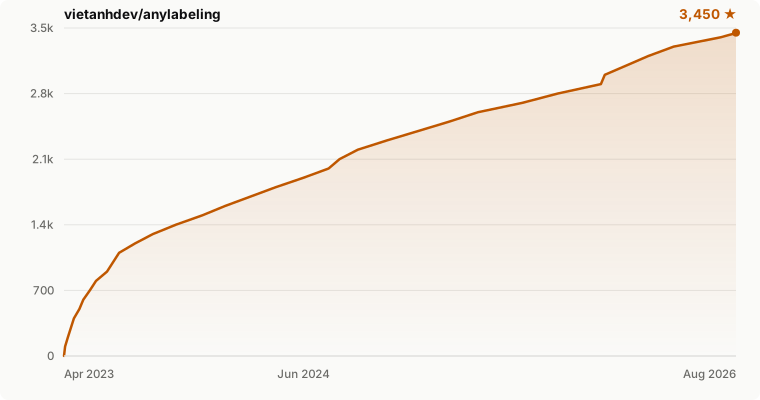](https://github.com/vietanhdev/anylabeling/stargazers) In the future, I will continue to improve AnyLabeling with more features and more integrations. Here are some ideas I have in mind: - **Documentation:** A documentation site was established at [anylabeling.nrl.ai](https://anylabeling.nrl.ai/). We can add more documentation and tutorials to help users to use AnyLabeling more easily. - **Improve Auto labeling:** Add more auto labeling tools, including OCR, text detection, text classification, etc. - **Improve the UI:** Add more features to the UI, including the ability to change the color of the objects, the ability to change the size of the points, etc. - **Improving the performance:** I think the performance of AnyLabeling can be improved a lot, including the Canvas rendering, the performance of the auto labeling tools, etc. If you have any ideas or suggestions, or you want to contribute to AnyLabeling, shoot me a message at **vietanhdev \[atttt\] gmail dot com**. Follow the current progress of AnyLabeling at [Github Repo](https://github.com/vietanhdev/anylabeling) and [Github Project](https://github.com/users/vietanhdev/projects/3).